'Waybound', Planning a Game

Introduction
After wrapping up my previous experience and just as I was about to start a new Unity project, I rewatched a calm film I’d seen about ten years ago and started thinking about the influence experiences have. After organizing my thoughts a bit, I found myself wanting to create something like that — just as a good film leaves a lasting experience. I’d also had a general desire to make and express things anyway.
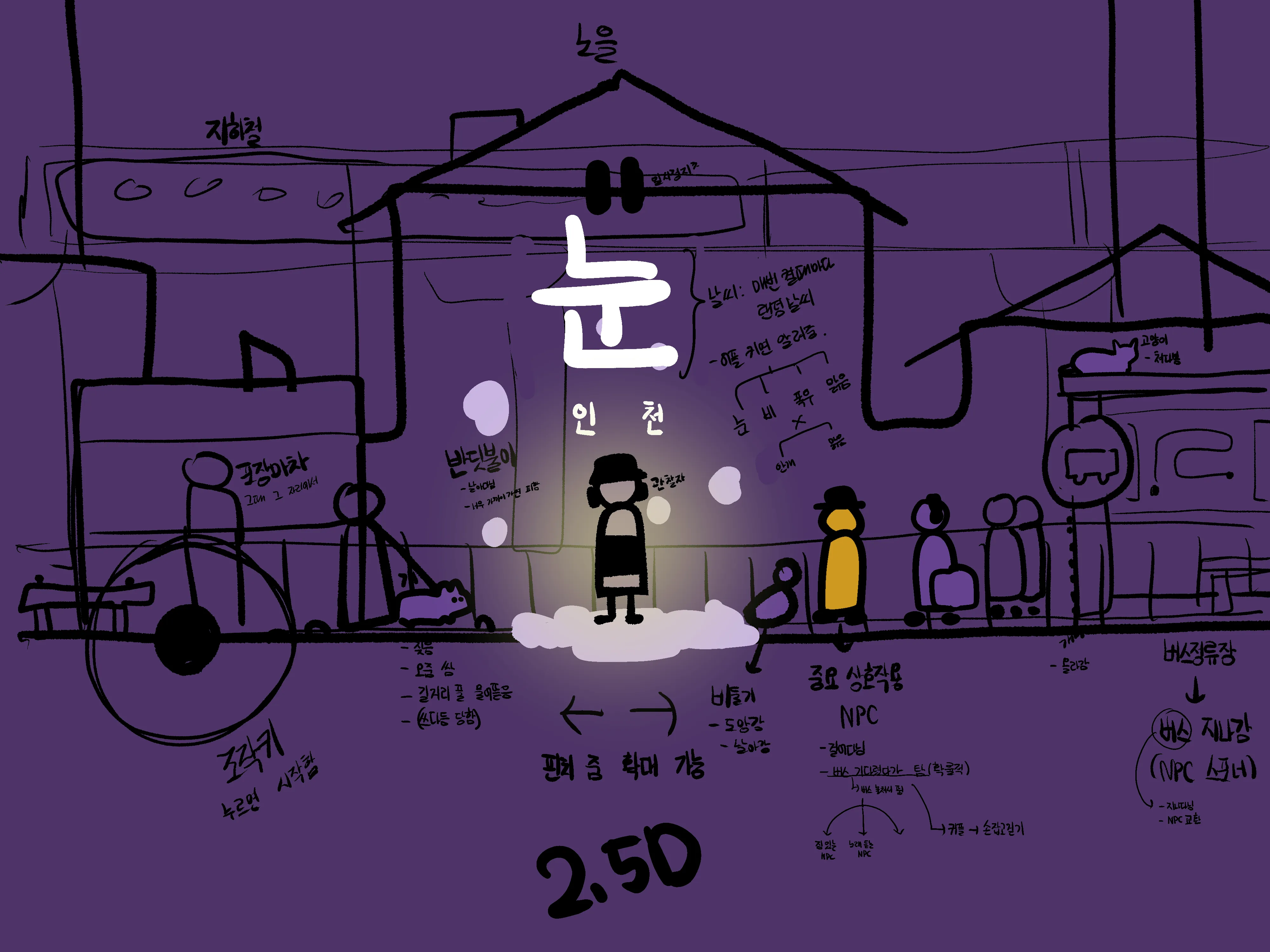 A rough concept art and plan drawn while chatting with a friend
Focusing on experience, I conceived an environment where objects within the scene would interact with each other on their own, even without the player performing any actions — a game where you simply observe and wander around with no scores or game-over conditions.
Based on this idea, I quickly sketched something out. The feel was better than expected, and the feedback from people around me was positive, so I began developing a plan around it.
Planning
The most regrettable thing about my previous project was the lack of planning. Without reference metrics and a long-term plan, it was difficult to set the game’s direction on a macro level, and on a micro level, it was hard to think about things like retention or profitability. So this time, I want to establish at least some planning upfront.
I looked for concepts that could help with game planning and came across something called a GDD (Game Design Document). It’s a kind of game specification document with no fixed format, so I referenced the GDD template created by Unity and wrote out only the necessary parts in advance.
Light GDD
- Basic Description
- Name: 행선지 (English: waybound)
- Genre: Side-scrolling adventure
- Format: 2.5D mobile
- Gameplay
- The player becomes a creature that makes up the environment — a person, dog, cat, ant, etc. — in a suburban setting and performs the interactions available to that creature. For example, a person can take a drink from a vending machine; a dog can sniff a bench on the street.
- Even when the player isn’t specifically controlling a creature, creatures interact with each other and shape the suburban atmosphere. Each creature has visual individuality within a given range.
- Key Features
- Various interactions between objects
- Hand-drawn images and cut-out animation
- Changing experiences based on weather — rain, snow, etc.
Example Objects
mindmap
    root((Objects))
        Living objects
            Person
            Dog
            Cat
            Pigeon
            Ant
            Firefly
        Non-living objects
            Vending machine
            Chair
            Trash can
            Food cart
        Background objects
            Townhouse
            Convenience store
            Cafe
            Bar
            Subway
Example Interactions
graph TD;
    Person -- Buy a drink --> Vending machine;
    Person -- Walk --> Dog;
    Person -- Pet --> Cat;
    Person -- Look at --> Firefly;
    Person -- Sit on --> Chair;
    Person -- Buy food --> Food cart;
Goals
Technical Goals
Previously, I had a lot of confusion when naming variables and functions. I couldn’t maintain either consistency or intuitiveness, making it increasingly burdensome to read and modify the code.
Then I came across a post about naming conventions on the Unity blog and was a bit shocked. If only I’d known this from the start, it would have been so much more convenient. It gave me a clear understanding of when and what to use for variable and function names in C#, and what practices to avoid.
As I looked for more conventions I should know about, I also discovered an e-book published by Unity called “Level up your code with game programming patterns”. I read through it carefully and learned about various usable techniques — SOLID principles, factory patterns, state patterns, and more. Based on that, I searched for derivative patterns and developed some things I wanted to try for more systematic code design. Summarizing, I came up with the following:
- PlasticSCM
- Event-driven programming
- Procedural animation
- Strict naming conventions
Among these, PlasticSCM is a version control system (VCS) meant to replace GitHub, which I plan to use to save my work intermittently during development. Event-driven programming and naming conventions are core to the development capabilities I want to gain through this project. Besides these, I also have smaller goals like better utilizing things I’m not yet comfortable with — singleton patterns, coroutines, delegates, get-set properties, and so on.
Artistic Goals
The basic goal is to depict the everyday atmosphere around us through the experience of line and image in motion. I want to express those things in a way that’s sufficiently visible but not overwhelming. I’m aiming for a cinematic feel if possible, and specifically plan to use the following:
- Cut-out animation
- Dynamic depth of field
- Tone curve
Overall, I’d like to make it engaging enough that the user can simply sit and watch the game screen and still be entertained. However, I do wonder whether I have the skill for that. In particular, I’ve heard that drawing the movements of animals — dogs, cats, pigeons, etc. — through cut-out animation is the domain of professional animators. I don’t need to create animations that precise, but since I lack background knowledge and experience, I expect there will be trial and error.
Roadmap
gantt
    title Phase 1 Roadmap

    Section Planning
    Planning :a1, 2024-02-28, 1d

    Section Development
    Prototype development :a2, 2024-02-28, 85d
    Visual composition: a3, 2024-05-23, 10d

    Section Release
    Release and post-launch support :a4, 2024-06-01, 213d

    %% a2["Prototype Complete"] : Develop an initial version of the prototype to verify functionality and test.